用 Okta Cross App Access 与 Amazon Bedrock AgentCore 治理 AI 智能体访问(上篇)
Govern AI agent access with Okta Cross App Access and Amazon Bedrock AgentCore – Part 1
Okta Cross App Access(XAA)与 Amazon Bedrock AgentCore 组合,在 IdP 侧决定哪个智能体能代表哪个用户访问哪个应用。
An AI agent that updates a ticket or reads a customer record acts for a person, inside applications that person can reach. Your identity team then has to answer a question that per-app OAuth consent and shared service accounts leave open: which agent might act for which user in which application, and how you stop it. Okta Cross App Access (XAA) answers it in your identity provider (IdP). You register the agent in Okta, an administrator approves the applications it might reach, and Okta evaluates policy each time the agent asks to act for a user. In our tests, after an administrator removed a user’s assignment to the agent, Okta refused the agent’s new requests for that user within about 1 second, and tokens already issued expired within 5 minutes.
Amazon Bedrock AgentCore is a platform to build, connect, and optimize agents at scale, with any framework or model. This solution uses two of its capabilities to carry out Okta’s decision on AWS. Amazon Bedrock AgentCore runtime, a capability of Amazon Bedrock AgentCore, validates Okta’s grant. Amazon Bedrock AgentCore Identity, a capability of Amazon Bedrock AgentCore, redeems it for a short-lived access token with credentials your agent code doesn’t see, and keeps that token in its token vault. In our tests, AgentCore Identity added about 0.6 seconds to a request that took about 30 seconds end to end.
In this post, the first of two, you build a task agent on AgentCore runtime that acts for signed-in users through XAA and AgentCore Identity. You configure the AgentCore Identity parts it needs, enforce each user’s authority in the tools, and see what we measured: what each check refuses, the practices we settled on, and how fast Okta’s controls take effect. Part 2 then puts the same governance behind Amazon Bedrock AgentCore Gateway, a capability of Amazon Bedrock AgentCore, with Cedar policies, a second agent on Amazon Elastic Kubernetes Service (Amazon EKS), and an audit trail in Amazon CloudWatch.
Solution overview
Okta is the governance plane: it decides which agent might act for which user, against which resource. AgentCore Identity is the execution plane: it holds the agent’s credentials, turns Okta’s decision into a token the resource accepts, and keeps both identities in that token. In Figure 1, the agent and the two Model Context Protocol (MCP) servers it calls all run on AgentCore runtime.
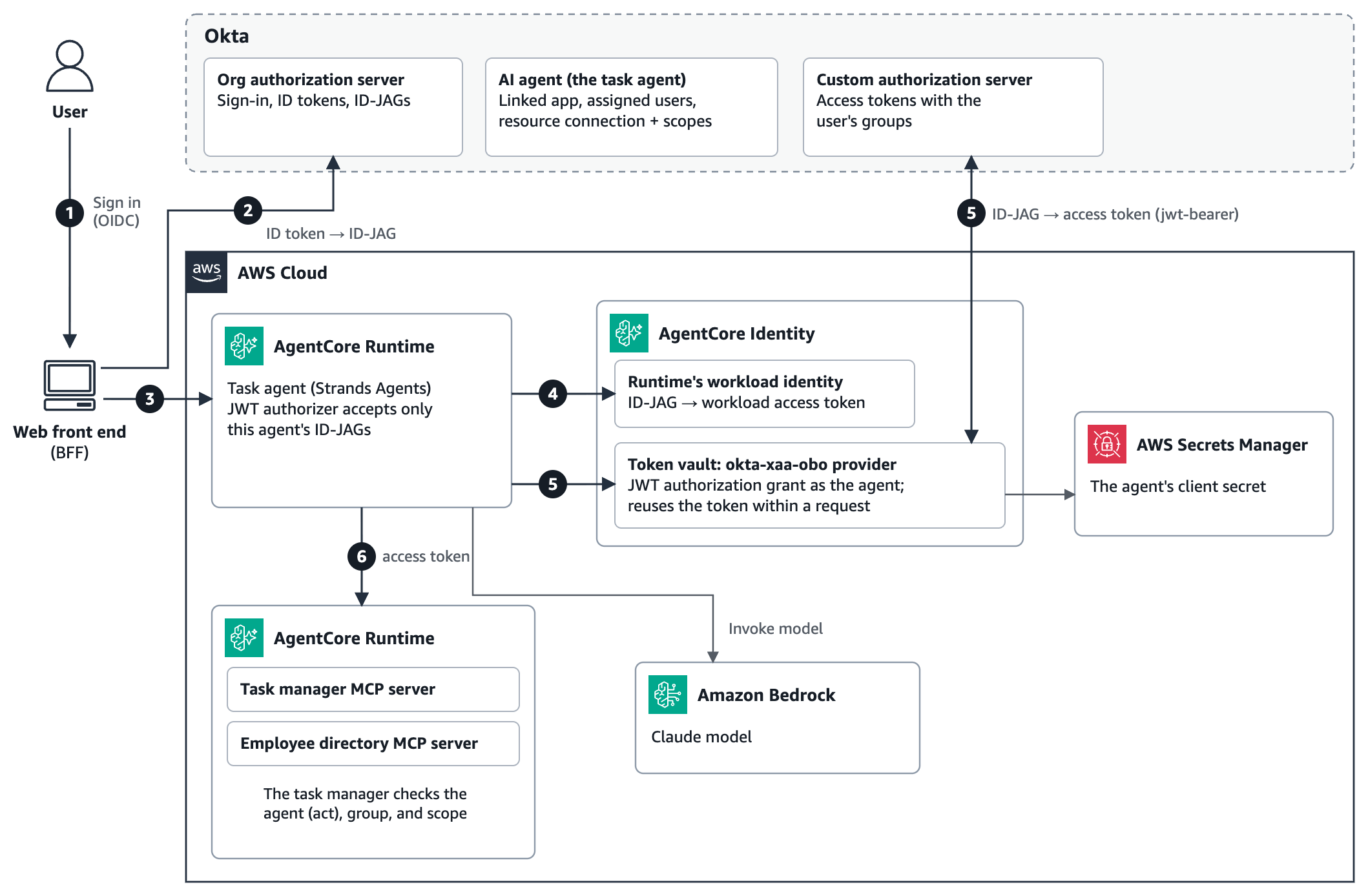
Figure 1: Solution architecture, with numbers matching the steps that follow
Each request carries three tokens, and each records a different decision: the ID token says who the user is, the Identity Assertion JWT Authorization Grant (ID-JAG) is Okta’s decision, and the access token is what the resource accepts. One request flows like this:
- The user signs in to the web front end, a backend for frontend (BFF), with OpenID Connect through the agent’s linked Okta app.
- For each request, the BFF exchanges the user’s ID token for an ID-JAG at Okta’s org authorization server, authenticated as the agent (RFC 8693 token exchange). Okta checks that the agent is active, that the user is assigned to it, and that an administrator connected it to the target authorization server for the requested scopes. The ID-JAG is single-use and expires in 5 minutes.
- The BFF invokes the agent on AgentCore runtime with the ID-JAG as its bearer token. The runtime’s JWT authorizer accepts only ID-JAGs that Okta issued to this agent.
- The runtime gets a workload access token from AgentCore Identity that binds the agent’s workload identity to the user, and passes it to the agent code. This workload access token is an AWS-internal binding token: neither Okta nor the resource sees it, so it isn’t one of the three tokens.
- The agent asks AgentCore Identity for an access token. AgentCore Identity redeems the ID-JAG at the resource’s Okta custom authorization server with the JWT authorization grant (RFC 7523), authenticated as the agent. Okta returns a 5-minute access token that names both the user and the agent and carries the user’s groups.
- The agent calls the MCP servers with that token. The task manager checks that a registered agent obtained it, and that the user’s group and scope allow the tool.
Figure 2 shows the same request as a sequence, with the check that each party makes.
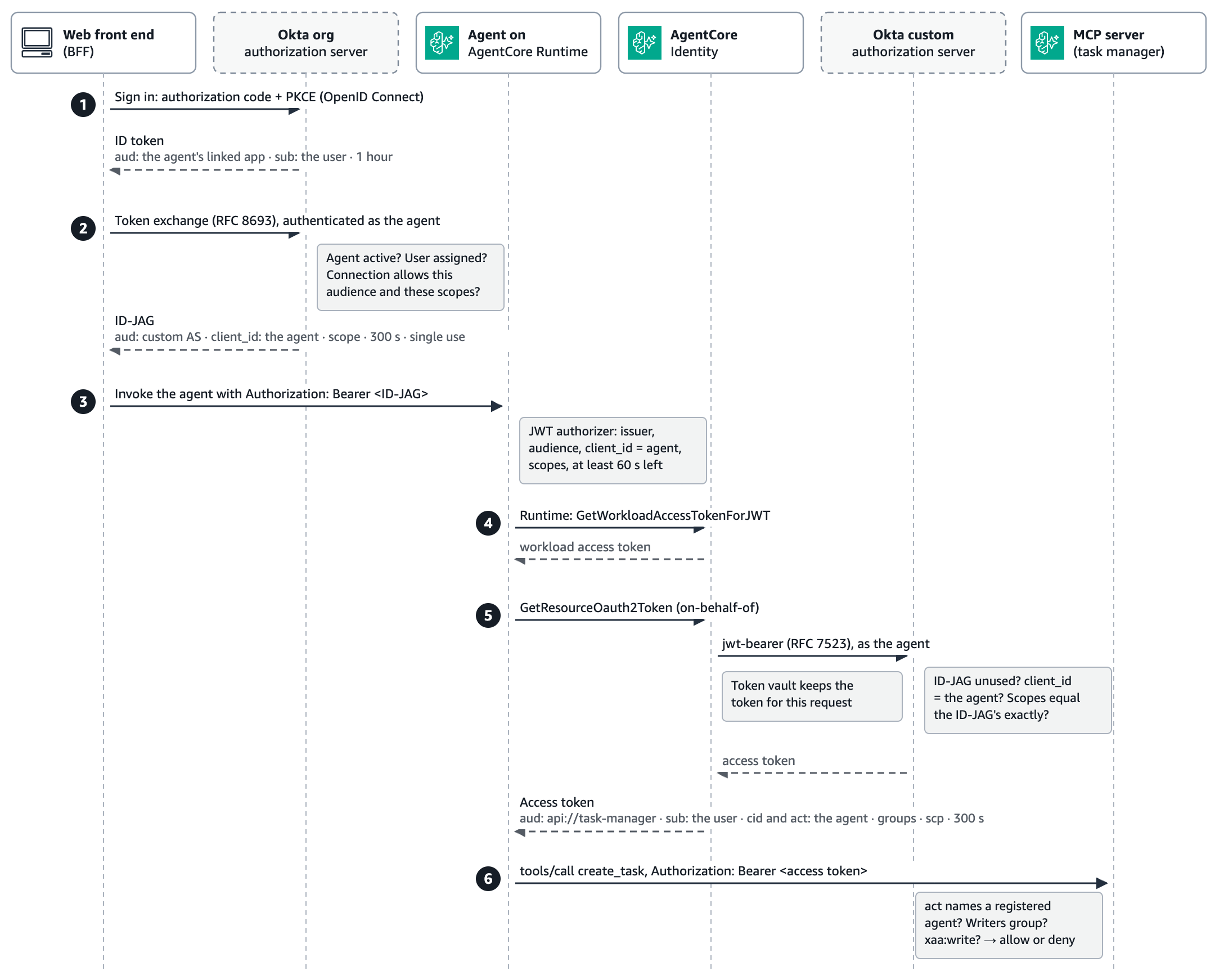
Figure 2: The three-token chain and the check each party makes, with the step 4 workload access token staying inside AWS
Prerequisites
To follow along, you need the following:
| Prerequisite | What we used |
| An AWS account with access to Amazon Bedrock AgentCore and an Anthropic Claude model in Amazon Bedrock | US West (Oregon) |
| An Okta org with Cross App Access for AI agents and API Access Management (custom authorization servers) | An Okta Integrator Free Plan org |
| Python, the AWS Command Line Interface (AWS CLI), boto3, the AgentCore CLI, and the AgentCore Python SDK, a capability of Amazon Bedrock AgentCore | Python 3.11, AWS CLI version 2, boto3 1.43, AgentCore CLI 0.31.1, and AgentCore Python SDK 1.24.1 |
| AWS Identity and Access Management (IAM) permissions | Permission to create AgentCore resources and IAM roles |
The walkthrough takes about 1 hour. AgentCore charges for what you use. See Amazon Bedrock AgentCore pricing.
The base for this solution is the AWS sample 08-okta-xaa-delegation-chain in the AgentCore samples repository on GitHub, and you can build the solution in this post on top of it. Beyond that sample, the snippets and configurations in this post show the pattern conceptually. They aren’t a complete, deployable solution. The code is sample code for non-production use, so work with your security and legal teams to meet your organization’s security, regulatory, and compliance requirements before you deploy it.
Register the agent in Okta
Okta needs an authorization server for the resource, the agent, a connection between them, and a policy that admits the agent’s grant. Do all of these steps in the Okta Admin Console: registering the agent creates its linked app, so you don’t need an app integration wizard.
- Create a custom authorization server for the resource application with the audience
api://task-managerand the custom scopesxaa:readandxaa:write. Request only the resource’s custom scopes: Okta rejects an ID-JAG request that includes OpenID Connect scopes such asopenidorprofile(invalid_scope), so a request needs at least one custom scope and no OpenID Connect scopes. - Add a
groupsclaim to its access tokens, filtered to groups that start withxaa-. This claim carries each user’s authority to the tools. - In the Admin Console, go to Directory > AI Agents, choose Register AI agent and then Register manually, optionally assign an owner, and create a linked OpenID Connect app. On Client registration, choose Client secret, generate a secret, and then activate the agent. The agent and the app share one client ID, and that app must sign your users in: an ID token from another app fails the exchange with “the client application is not registered for delegation to this agent.”
- On the agent’s Resource connections tab, connect it to the authorization server, limited to the scopes it needs, as Figure 3 shows.
- Add an access policy rule to the custom authorization server that allows the agent’s JWT Bearer grant, with a 5-minute access token lifetime. Without the grant type, the second exchange fails with
no_matching_policy, and the lifetime bounds how long a revoked delegation keeps working. - Assign the users or groups who might act through the agent. They sign in through the linked app, so give it an app sign-in policy that admits them with the authenticators they’ve enrolled. In our sandbox org, the linked app had its own policy with a rule for the test group. For real users, apply your organization’s policy, including multifactor authentication.
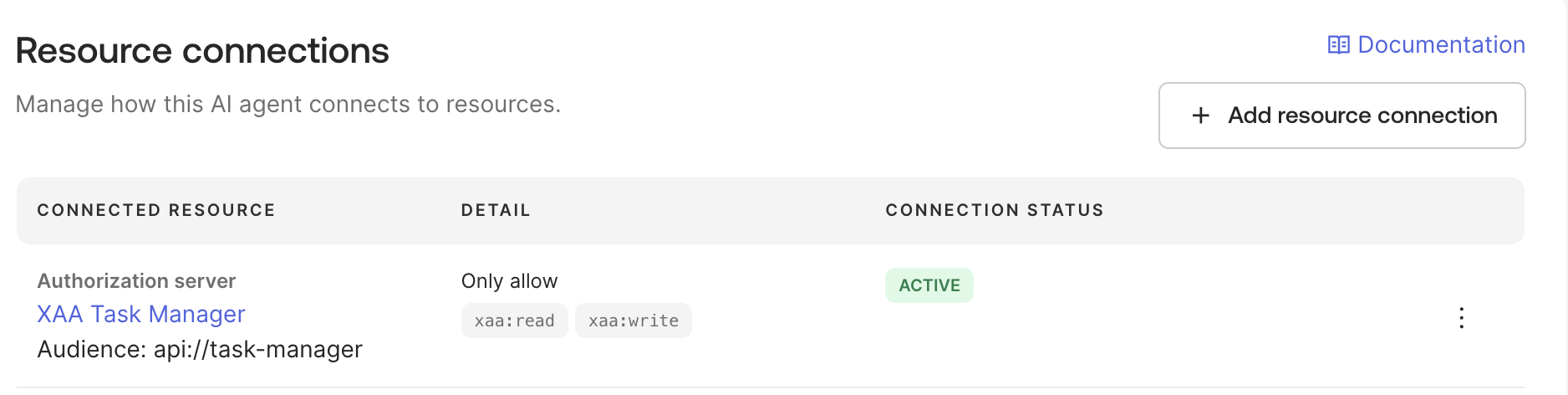
Figure 3: The task agent’s resource connection in Okta, limited to the xaa:read and xaa:write scopes
Okta’s Cross App Access guide covers the console steps, and the AWS sample 08-okta-xaa-delegation-chain scripts the authorization server and its JWT bearer policy. The BFF then requests the ID-JAG, authenticated as the agent:
POST /oauth2/v1/token HTTP/1.1
Host: YOUR-ORG.okta.com
Authorization: Basic <the agent's client ID and secret>
Content-Type: application/x-www-form-urlencoded

grant_type=urn:ietf:params:oauth:grant-type:token-exchange
&requested_token_type=urn:ietf:params:oauth:token-type:id-jag
&subject_token=<the user's ID token>
&subject_token_type=urn:ietf:params:oauth:token-type:id_token
&audience=https://YOUR-ORG.okta.com/oauth2/YOUR-CUSTOM-AS-ID
&scope=xaa:read xaa:write
The AWS sample 06-okta-xaa sends the same request in Python (agent/xaa_client.py). The BFF authenticates as the agent, so store the agent’s client secret in AWS Secrets Manager rather than in code or configuration files.
Set up AgentCore Identity
AgentCore Identity holds three things for this solution, and your agent code doesn’t see the client secret or call Okta’s token endpoint:
| Part of AgentCore Identity | What it holds | Who creates it |
| Workload identity | The agent’s identity on AWS, bound to the signed-in user for each request | AgentCore runtime, for each agent runtime |
| OAuth2 credential provider | The agent’s Okta client ID and secret, and the grant to use | You, once per Okta agent |
| Token vault | The access tokens the provider obtains | AgentCore Identity |
Create the credential provider
The credential provider performs the second exchange. Point it at the custom authorization server, authenticate it as the AI agent, and set the on-behalf-of grant to JWT_AUTHORIZATION_GRANT, which AgentCore Identity sends as jwt-bearer with the ID-JAG as the assertion:
control = boto3.client("bedrock-agentcore-control")
provider = control.create_oauth2_credential_provider(
    name="okta-xaa-obo",
    credentialProviderVendor="CustomOauth2",
    oauth2ProviderConfigInput={"customOauth2ProviderConfig": {
        "oauthDiscovery": {"discoveryUrl": f"{OKTA_ORG}/oauth2/{CUSTOM_AS_ID}/.well-known/openid-configuration"},
        "clientId": AGENT_CLIENT_ID,          # the AI agent's Okta client ID
        "clientSecret": AGENT_CLIENT_SECRET,  # AgentCore Identity stores it in AWS Secrets Manager
        "clientAuthenticationMethod": "CLIENT_SECRET_BASIC",
        "onBehalfOfTokenExchangeConfig": {"grantType": "JWT_AUTHORIZATION_GRANT"},
    }},
)
provider_arn = provider["credentialProviderArn"]
Okta binds both exchanges to the client named in the ID-JAG, so each Okta agent needs its own provider: when we redeemed one agent’s ID-JAG as another, Okta refused with “The ‘client_id’ in the JWT Bearer Grant must match the ‘client_id’ used to authenticate the client.” AgentCore Identity keeps the secret in a service-managed AWS Secrets Manager secret, which you rotate with update-oauth2-credential-provider. If your team already manages the client secret in Secrets Manager, you can reference that secret’s ARN instead. AgentCore Identity reads the client secret from it, so you can rotate the secret without updating the provider (see Reference your own AWS Secrets Manager secrets in Amazon Bedrock AgentCore Identity). To avoid a shared secret, authenticate with a private key instead. See Authenticate with Private Key JWT using Amazon Bedrock AgentCore Identity. Figure 4 shows the provider in the AgentCore console.
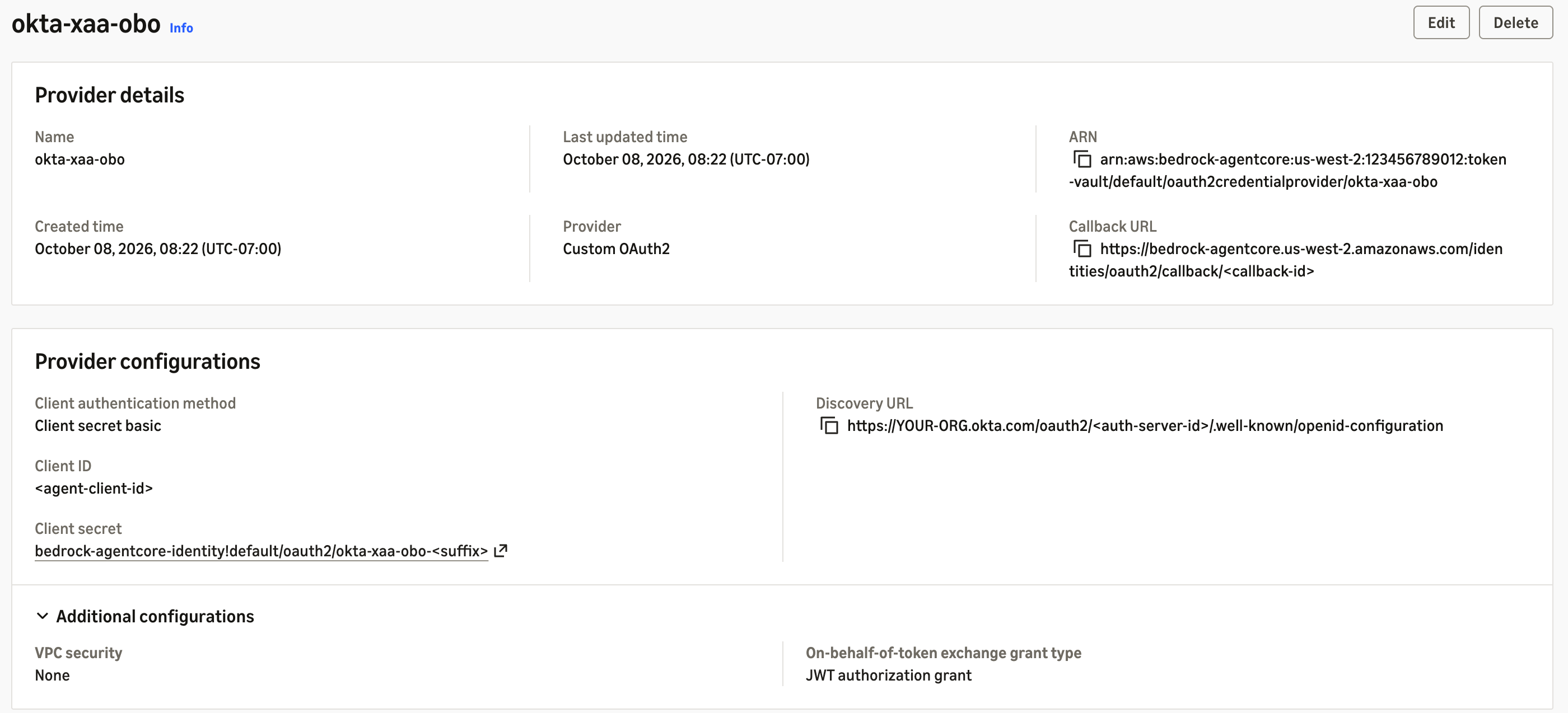
Figure 4: The credential provider authenticating as the agent with the JWT authorization grant
Use the workload identity that AgentCore runtime manages
AgentCore runtime creates and manages a workload identity for each agent runtime. When a request passes the runtime’s JWT authorizer, the runtime gets a workload access token for that workload identity and the inbound token’s issuer and subject, and passes it to your code. AgentCore Identity then uses the ID-JAG behind it as the assertion for the exchange.
The AgentCore Python SDK keeps the workload access token in BedrockAgentCoreContext, not in the request headers that your entrypoint receives. Our first version looked for it in the headers, found nothing, and fell back to its own GetWorkloadAccessTokenForJWT call with a second workload identity, on all 21 requests we checked. Read it from the context instead:
from bedrock_agentcore.runtime import BedrockAgentCoreContext

identity = boto3.client("bedrock-agentcore")

def okta_access_token() -> str:
    workload_token = BedrockAgentCoreContext.get_workload_access_token()  # minted by the runtime
    return identity.get_resource_oauth2_token(
        workloadIdentityToken=workload_token,
        resourceCredentialProviderName="okta-xaa-obo",
        scopes=["xaa:read", "xaa:write"],  # must equal the ID-JAG's scopes
        oauth2Flow="ON_BEHALF_OF_TOKEN_EXCHANGE",
    )["accessToken"]
AgentCore Identity keeps the access token in its token vault for the rest of the request. Across 10 requests, the agent’s first call redeemed the ID-JAG in about half a second (see the latency table in Validate the results), and the second, for the other MCP server, returned the same token in a median of 58 milliseconds without redeeming the single-use ID-JAG again. A new ID-JAG for the same user got a new token, so each request reflects Okta’s latest decision. The sample 08-okta-xaa-delegation-chain reads the workload access token the same way (agent/agent.py).
Scope the agent’s role to its workload identity and provider
AgentCore Identity doesn’t bind workload identities to credential providers in the same account. The agent’s IAM role does, so scope it to the agent’s own workload identity and provider, and to that provider’s secret:
[
  {
    "Sid": "OktaOnBehalfOf",
    "Effect": "Allow",
    "Action": "bedrock-agentcore:GetResourceOauth2Token",
    "Resource": [
      "arn:aws:bedrock-agentcore:us-west-2:123456789012:workload-identity-directory/default",
      "arn:aws:bedrock-agentcore:us-west-2:123456789012:workload-identity-directory/default/workload-identity/RUNTIME-WORKLOAD-IDENTITY",
      "arn:aws:bedrock-agentcore:us-west-2:123456789012:token-vault/default",
      "arn:aws:bedrock-agentcore:us-west-2:123456789012:token-vault/default/oauth2credentialprovider/okta-xaa-obo"
    ]
  },
  {
    "Sid": "ReadProviderSecret",
    "Effect": "Allow",
    "Action": "secretsmanager:GetSecretValue",
    "Resource": "arn:aws:secretsmanager:us-west-2:123456789012:secret:bedrock-agentcore-identity!default/oauth2/okta-xaa-obo-*"
  }
]
Take the workload identity’s name from workloadIdentityDetails in GetAgentRuntime, and the provider’s ARN from credentialProviderArn: the segment is oauth2credentialprovider, and with the hyphenated form every call failed with AccessDeniedException. The role needs no GetWorkloadAccessToken permission, because the runtime gets that token, not the agent. Our tests passed with only these two statements.
Deploy the agent on AgentCore runtime
Configure the agent runtime’s inbound authorizer to accept only ID-JAGs that Okta issued to this agent. Its issuer is Okta’s org authorization server, and its audience is the resource’s custom authorization server. In agentcore.json:
"authorizerType": "CUSTOM_JWT",
"authorizerConfiguration": {
  "customJwtAuthorizer": {
    "discoveryUrl": "https://YOUR-ORG.okta.com/.well-known/openid-configuration",
    "allowedAudience": ["https://YOUR-ORG.okta.com/oauth2/YOUR-CUSTOM-AS-ID"],
    "allowedClients": ["YOUR_AGENT_CLIENT_ID"],
    "allowedScopes": ["xaa:read", "xaa:write"]
  }
}
allowedClients matches the client_id claim that an ID-JAG carries. Without it, the runtime admitted another agent’s ID-JAG with HTTP 200 and the request failed later, at the exchange. With it, the runtime refused that token with HTTP 401.
Besides the policy from the previous section, the execution role needs bedrock:InvokeModel and bedrock:InvokeModelWithResponseStream. It needs no bedrock-agentcore:InvokeAgentRuntime permission for the MCP servers: each runs on AgentCore runtime behind its own JWT authorizer, with the custom authorization server as issuer and api://task-manager as audience, so the agent calls it with the Okta access token as a bearer token, not with AWS Signature Version 4 (SigV4).
Enforce each user’s authority in the MCP server
The resource connection sets the scopes for every user of an agent, so all three test users received xaa:read xaa:write, and per-user authority travels in the groups claim instead: Alice’s token carried xaa-readers, Bob’s xaa-writers, and Carol’s had none.
The task manager checks two things: it accepts only tokens a registered agent obtained, and it allows a write only when the group and the scope are both present:
REGISTERED_AGENTS = {"YOUR_AGENT_CLIENT_ID"}

def _require_agent() -> None:
    claims = _decode_claims()  # the runtime's JWT authorizer already validated the token
    agent = (claims.get("act") or {}).get("sub")
    if agent in REGISTERED_AGENTS and claims.get("cid") == agent:
        return
    raise ToolError("insufficient_privileges: this server accepts only tokens that a registered "
                    "AI agent obtained through Okta Cross App Access")

def _require_write() -> None:
    _require_agent()
    if WRITERS_GROUP in _groups() and "xaa:write" in _scopes():
        return
    raise ToolError(f"insufficient_privileges: this tool requires membership in '{WRITERS_GROUP}'")
Both checks close gaps we found: a write check that allowed tokens without a groups claim let Carol, who belongs to neither group, create tasks, and before _require_agent a plain token-exchange token, issued to a service app with no act claim, created a task for Bob. The server can read the claims without verifying the token again only because the runtime’s JWT authorizer already verified it. A server without that authorizer in front of it must check the signature, issuer, audience, and expiry itself, as the Part 2 agent on Amazon EKS does.
Validate the results
We ran every check against the deployed solution. Alice, Bob, and Carol each asked the agent to create a task and then list the project’s tasks:
| Caller | create_task |
list_tasks |
| Alice | Denied: requires membership in xaa-writers |
Allowed |
| Bob | Created | Allowed |
| Carol | Denied: no groups claim |
Allowed |
| Bob, then Alice right after him | Created for Bob, then denied for Alice: no authority carried over | Allowed |
These requests stopped before tools ran:
| Request | Stopped by | Response |
| Agent B’s ID-JAG sent to the task agent | The runtime’s JWT authorizer | 401: “Claim ‘client_id’ value mismatch with configuration.” |
| An ID-JAG held for 245 seconds | The runtime’s JWT authorizer | 401: “Ineffectual token, will expire within the next minute” |
| A malformed bearer token | The runtime’s JWT authorizer | 403: “Failed to parse token” |
| One ID-JAG redeemed twice | Okta’s custom authorization server | 400: “The id-jag was already used.” |
| A narrower scope at the second exchange | Okta’s custom authorization server | 400: “The scope parameter must exactly match the scopes in the id-jag.” |
| A scope outside the connection | Okta’s org authorization server | 400 invalid_scope |
| A plain token exchange token at the MCP server | The MCP server | Denied: only tokens that a registered AI agent obtained |
The token that AgentCore Identity returned matched one we redeemed directly at Okta, claim for claim: sub was the user, cid and act named the agent, scp held the connection’s scopes, groups held the user’s groups, and it lived 300 seconds.
AgentCore Identity adds about 0.6 seconds to a request that takes about 30 seconds end to end, most of it model and tool calls. Medians of five runs from our test client:
| Call | Median |
| Sign-in, scripted (authorization code flow) | 1,205 ms |
| ID token to ID-JAG at Okta’s org authorization server | 216 ms |
GetWorkloadAccessTokenForJWT |
135 ms |
GetResourceOauth2Token, including Okta’s JWT bearer grant |
508 ms |
Govern agents in operation
Okta evaluates the agent, the user, and the connection when it mints an ID-JAG. We measured what each administrator action does to the next request and to issued tokens:
| Admin action in Okta | New requests | Tokens already issued |
| Delete the agent’s resource connection | Refused immediately (invalid_target) |
Work until they expire, up to 5 minutes |
| Remove the user’s assignment | Refused within about 1 second, even with an ID token the user already held | Up to 5 minutes |
| Deactivate the agent | Refused after Okta runs the operation, which our test org queued for 86 minutes | Up to 5 minutes |
Actions on one agent left the other working. Okta doesn’t re-check the user when an ID-JAG is redeemed: its custom authorization server issued an access token 3 seconds after we removed a user, for an ID-JAG minted before the removal. Okta’s System Log records each grant with the agent as the actor, and Part 2 streams those events into CloudWatch.
Best practices for the delegation chain
Six practices came out of these measurements, each one a property of the chain rather than a preference:
| Practice | What we measured |
| Mint a fresh ID-JAG for each request | An ID-JAG is single-use and lives 300 seconds. The runtime refuses one with under 60 seconds left, so 225 seconds worked, 245 didn’t |
Carry per-user authority in the groups claim, and request one scope set per request |
Okta sets scopes from the resource connection, so all three users got the same scopes, and the second exchange must request exactly the ID-JAG’s |
Pin the agent at the runtime, and check act and cid in the tool |
allowedClients matches the client_id claim an ID-JAG carries. Okta access tokens carry cid instead |
| Reproduce a failed exchange directly against Okta | Through AgentCore Identity, a scope mismatch and a wrong client both surface as “Token exchange failed with HTTP status 400” |
| Grant the agent’s role read access to the provider’s secret | GetResourceOauth2Token failed until the role could read it |
| Keep lifetimes short, and use the resource connection as your kill switch | Deleting the connection took effect immediately. Deactivating the agent sat in Okta’s beta AI agent API queue for 86 minutes, with no cancel |
Cross App Access compared with plain token exchange
Plain RFC 8693 token exchange also carries the user’s identity downstream. We compared it with XAA against the same Okta authorization server and user:
| Behavior we observed | Plain token exchange | Cross App Access |
| Agent identity in the token | No act claim |
act names the agent |
| Scopes | Widened: Alice’s own token had xaa:read, and the exchange returned xaa:read xaa:write |
The scopes the administrator approved |
Exchange rule limited to xaa-writers |
Alice still received a token | Alice denied |
| User unassigned, earlier token reused | Still exchanged | Refused |
| What administrators see | A service app with a grant type | The agent, its connections, and the agent in each log event |
These results reflect our Okta configuration. Okta’s guide shows an act claim for exchanged tokens, which we didn’t receive. Plain token exchange carried the user’s identity, but not the user’s authority.
Where this pattern applies
We work with media and entertainment companies, and this is where we met the problem first. A studio or streaming or games organization runs agents against production tracking, title and asset metadata, rights and localization, and viewer or player support. Each system has its own authorization model and its own auditors, and a user’s authority differs by title, territory, or release window, so “which agent might act for which user in which system” has to be answered before an agent ships.
Nothing in the chain is specific to that industry: the agent is an identity in your IdP, the target is an OAuth 2.0 authorization server, and the user’s authority rides in a claim. Financial services, healthcare, and public sector teams put different resources behind the same controls.
Clean up
To avoid ongoing charges, delete the resources you created:
- Delete the AWS CloudFormation stacks that the AgentCore CLI created for the agent and the two MCP servers.
- Delete the credential provider with
aws bedrock-agentcore-control delete-oauth2-credential-provider --name okta-xaa-obo, and any workload identity you created yourself withdelete-workload-identity. - Delete the IAM policies you added to the execution roles.
- In Okta, deactivate and delete the AI agent and its linked app, and remove the resource connection, the authorization server’s policy rule, scopes, and claim, and the test users and groups.
Conclusion
In this post, you used Okta Cross App Access to decide which agent might act for which user, and AgentCore Identity to carry out each decision. The runtime admitted only the agent’s own ID-JAGs, the credential provider redeemed each one with a secret the agent didn’t hold, the token vault reused the result within a request, and the MCP server enforced each user’s authority from the groups claim.
This design keeps the exchange in the agent’s role and repeats the authorization check in every MCP server. See Part 2 of this series to learn why its design moves both behind one AgentCore Gateway with Cedar policies, adds a second agent on Amazon EKS, and joins the Okta System Log with AgentCore traces in CloudWatch.
To get started, explore the AgentCore samples and Okta’s Cross App Access documentation. For the API details, see On-behalf-of token exchange in the AgentCore Developer Guide.
About the authors

Hammad Ausaf
Hammad is a Principal Solutions Architect in Media and Entertainment. He is a passionate builder and strives to provide the best solutions to AWS customers.

Rajat Jain
Rajat is a Technical Account Manager in Media and Entertainment at AWS with over 3 years at the company. He guides customers through operational best practices and helps them get the most out of AWS services.

Madhu Samhitha Vangara
Madhu is a Worldwide Generative AI Specialist Solution Architect at AWS, focusing on agentic AI go-to-market for Amazon Bedrock AgentCore and Strands Agents. She translates emerging AI capabilities and research into measurable outcomes for customers. Outside work, she’s a trained Indian classical dancer and an art enthusiast.
来源:AWS Machine Learning Blog · aws.amazon.com