用 Amazon Nova Multimodal Embeddings 与 Bedrock AgentCore 构建多智能体工程智能助手
Agentic engineering intelligence with Amazon Nova Multimodal Embeddings and Amazon Bedrock AgentCore
基于 Amazon Nova Multimodal Embeddings 和 Amazon Bedrock AgentCore,可搭建多智能体工程助手,自动完成零件替代评估中的跨文档比对。
When a qualified aerospace component goes obsolete or hits a long lead time, an engineer spends days cross-referencing specifications across vendor datasheets, interface control documents (ICDs), and qualification records before documenting a substitution justification for review. An incorrect substitution on a flight-critical component can cause mission failure, yet the evidence trail behind each decision is often spread across email and undocumented institutional knowledge, so there is no formal, repeatable package for a reviewer to check.
A previous post, Manufacturing intelligence with Amazon Nova Multimodal Embeddings, showed how the model retrieves answers locked inside engineering diagrams, thermal plots, and datasheet charts that text-only pipelines miss. This post picks up where that retrieval work left off, putting those capabilities inside a multi-agent system that assembles substitution evidence, from retrieval to a drafted assessment.
In this post, we show how to build a multi-agent engineering assistant that cuts the manual cross-referencing behind part substitution evaluation using Amazon Bedrock AgentCore, Amazon Nova Multimodal Embeddings, and the open source Strands Agents SDK. A planner routes work across three specialist agents that search a multimodal knowledge base, score candidates against deterministic tolerance rules, compare part photos, and ground lifecycle claims in live web data. The engineer remains the decision-maker throughout, because the system assembles evidence and drafts documents without ever approving a substitution on its own.
Solution overview
The assistant is built around one design rule, which is that the engineer makes every decision and the system assembles the evidence for it. That rule determines where we use large language models (LLMs) and where we use deterministic code instead.
Three pillars define the architecture:
- Deterministic spec-fit evaluation – Tolerance-rule code written in Python scores each candidate part against the reference part and the engineer’s stated requirements. Because the same inputs consistently produce the same pass/flag verdicts, the results can go into a formal engineering review.
- Multi-agent orchestration – A lightweight planner routes each query to one or more of three specialist agents (Catalog, Evaluation, Knowledge), and a supervisor synthesizes their findings only when more than one specialist contributed. Complex questions such as “Check if this wheel is going end-of-life, find alternatives, and score them” chain all three specialists in sequence.
- Human-in-the-loop decision – The system drafts justification memos and Integration Impact Assessments for engineering review, but it doesn’t recommend or approve a substitution. Every evaluation also writes an audit trail entry aligned with AS9100 sections 8.4 and 8.5.6.
The following diagram shows the architecture.
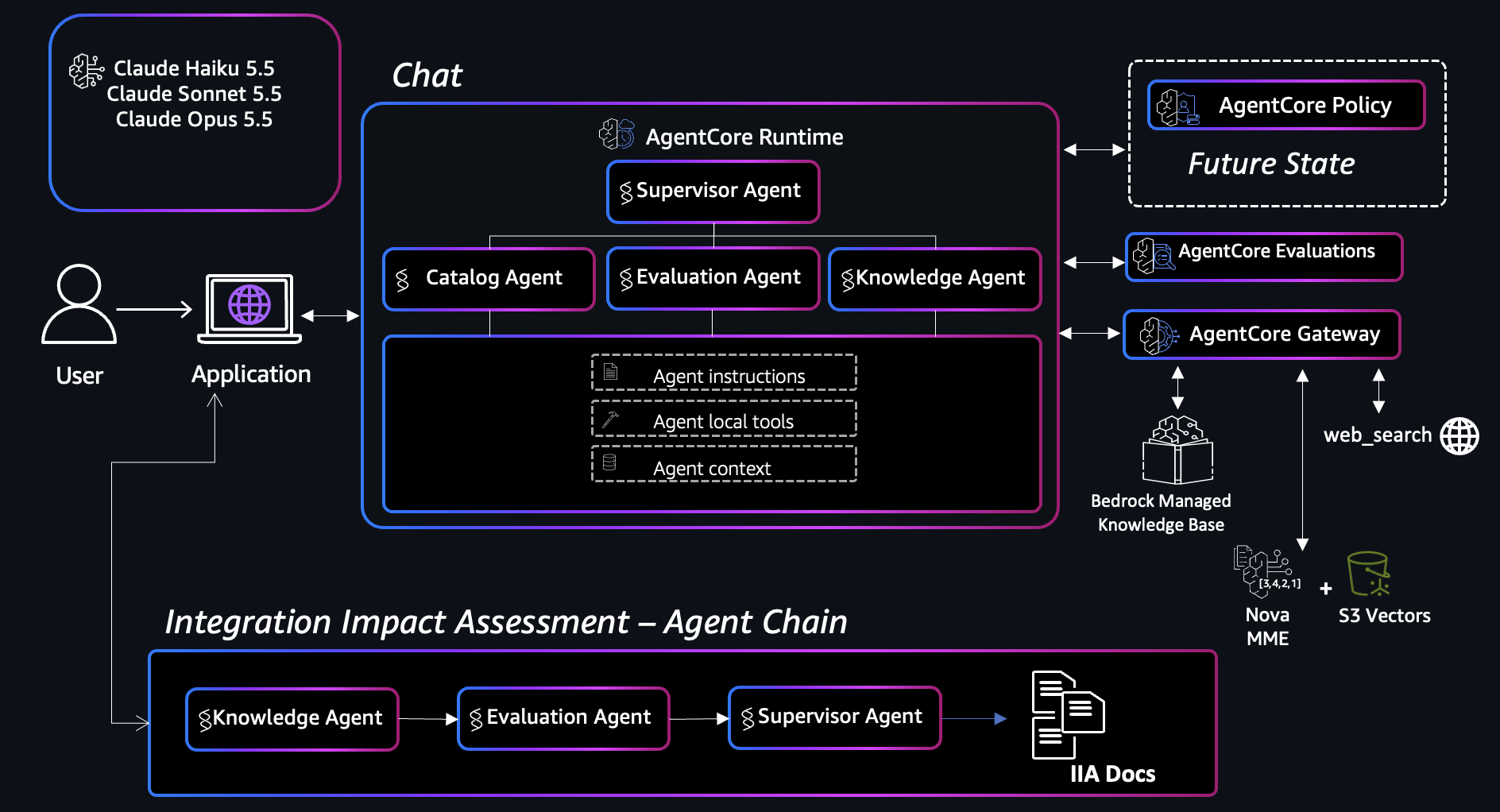
Figure 1: Architecture of the multi-agent engineering assistant on Amazon Bedrock AgentCore
Amazon Bedrock AgentCore is a platform to build, connect, and optimize agents at scale, with any framework or model. In this solution, chat requests from the engineer’s application flow into a multi-agent graph hosted on AgentCore runtime: a planner (Claude Haiku 5.5) produces a routing plan, specialists (Claude Sonnet 5.5) execute their tools, and a supervisor (Claude Opus 5.5) synthesizes their results when more than one specialist ran. The specialists retrieve from a managed knowledge base that we created with Amazon Bedrock Managed Knowledge Bases using Amazon Nova Multimodal Embeddings, routed through an AgentCore Gateway, a capability of Amazon Bedrock AgentCore, alongside the Web Search connector for live web data. For image-as-query (uploading a chart to identify a part), the agent calls a native Amazon S3 Vectors index directly, because the managed knowledge base retrieval API doesn’t accept image input. Amazon S3 Vectors is a capability of Amazon Simple Storage Service (Amazon S3). A separate fixed chain (Knowledge, then Evaluation, then Supervisor) produces the formal Integration Impact Assessment (IIA) document.
Amazon Nova Multimodal Embeddings appears in two distinct roles:
- Multimodal retrieval – Datasheets, ICDs, and performance charts are embedded with Nova Multimodal Embeddings so text and visual content share one semantic space. An engineer can enter “torque curve for the 0.06 Nms wheel” or upload a chart image, and retrieval returns the matching diagram with source attribution.
- Visual similarity scoring – When two candidate parts are compared, Nova Multimodal Embeddings produces a quantitative cosine similarity between their photos, and Claude analyzes the specific physical differences (mounting pattern, connector placement, housing geometry). The score adds supporting evidence to the deterministic spec comparison, which is what the fit verdict is based on.
Prerequisites
To follow along, you need:
- An AWS account with access to Amazon Bedrock in the US East (N. Virginia) AWS Region.
- Model access to Amazon Nova Multimodal Embeddings, Claude Haiku 5.5, Claude Sonnet 5.5, and Claude Opus 5.5 in Amazon Bedrock. For model availability by Region, see Model support by AWS Region in Amazon Bedrock.
- A managed knowledge base created with Amazon Bedrock Managed Knowledge Bases, using Amazon Nova Multimodal Embeddings over your parts corpus (datasheets, ICDs, descriptions) for text and document retrieval.
- An Amazon S3 Vectors index over your part photos and datasheet chart crops, for the image-as-query path.
- An Amazon Bedrock AgentCore Gateway with the Web Search connector and a managed knowledge base target.
- Python 3.10 or later and Jupyter for running the notebooks.
- Docker, if you adapt the deployment recipe in notebook 03 to host the agent on AgentCore runtime.
- The sample code from the GitHub repository.
Solution walkthrough
The following sections describe each part of the system in the order a query uses it. We start with the parts corpus and the specialist agents, then cover routing, deterministic scoring, the two ways the assistant uses Nova Multimodal Embeddings, the fixed chain that produces formal documents, and deployment to AgentCore runtime.
The complete code sample is a set of five Jupyter notebooks in the GitHub repository, and each notebook runs on its own. The notebooks import from mei_core, a self-contained copy of the agent and tool modules in the same folder, and they include their own parts data, chart crops, and evaluation query set. You can run every snippet in this post from the notebooks without other application code.
Structure the parts corpus
The sample dataset is seven reaction wheels from a fictional manufacturer (AnyCompany) spanning 0.003–5.0 Nms of momentum storage. Each part is a folder that pairs structured data with the source documents an engineer actually reads, and this mix is what makes the corpus multimodal. The specs.json file holds the machine-readable fields that drive deterministic scoring, while the ICD, product photo, and rendered datasheet page carry the visual and narrative detail that structured fields leave out.
data/synthetic-parts-data/rw_rl_0060/
├── specs.json # structured specs + lifecycle fields
├── description.txt # flat text for text retrieval
├── AC-ICD-00068-RW3-0.06-Interface-Control-Document-v2.2.pdf
├── datasheet_page.png # rendered datasheet page
├── datasheet_chart.png # cropped chart region (image-as-query index)
└── photo.png # product image (visual similarity + chart matching)
The specs.json file captures both the engineering specifications and a lifecycle profile, which is what lets the assistant flag obsolescence and lead-time risk alongside spec fit.
{
  "name": "AnyCompany RW3 0.06",
  "category": "reaction_wheel",
  "vendor": "AnyCompany",
  "model": "RW3-0.06",
  "momentum_storage_nms": 0.06,
  "max_torque_mnm": 20,
  "mass_g": 235,
  "voltage_v": "28",
  "voltage_range_v": "7.5 to 36",
  "operating_temp_c": "-30 to +70",
  "interface": "RS-422 or Redundant RS-485",
  "qual_standard": "AnyCompany internal (flight heritage qualified)",
  "lifecycle": {
    "lifecycle_status": "Active",
    "production_status": "Full production",
    "estimated_years_to_eol": "10+",
    "last_time_buy": "Not announced",
    "typical_lead_time_weeks": 10,
    "lead_time_risk": "Low",
    "bathtub_region": "Useful life (highly mature)",
    "recommended_screening": "Standard flight acceptance"
  }
}
The vendor field is stated explicitly for every part. Because catalog folder IDs and file names are reused across datasets, every specialist prompt treats the structured vendor value returned by get_part_specs as authoritative and is forbidden from guessing a manufacturer from an ID, a file name, a photo, or a web search result. Taking the manufacturer from structured data keeps the assistant from attributing a part to the wrong supplier because the model thinks it recognizes the hardware.
Each part folder also carries two assets that text-only indexing cannot use. The product photo feeds visual similarity scoring, and the rendered datasheet page carries torque-box and torque-curve plots that answer performance questions no OCR text layer captures. Amazon Nova Multimodal Embeddings embeds both into the same vector space as the text, so a query can match a spec value, a paragraph, or a plot.
The following sample shows four datasheet pages from the corpus, spanning three orders of magnitude of momentum storage.
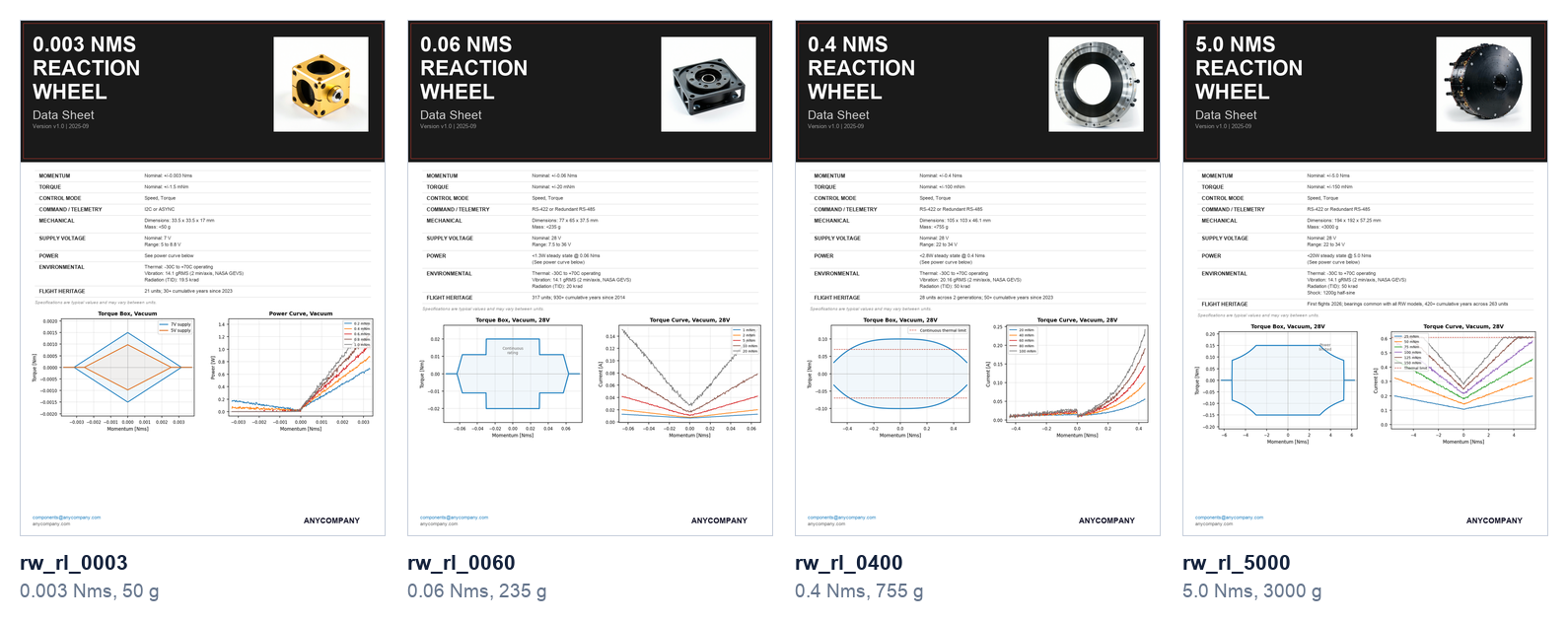
Figure 2: Four datasheet pages from the parts corpus, spanning three orders of magnitude of momentum storage
The template repeats across the family, but the product photo and the pair of performance plots change with every part. These Regions show the housing geometry, mounting pattern, torque envelope, and power draw, which the spec fields don’t state directly, so we embed them alongside the text.
Define specialists with scoped tools
Each specialist is a Strands agent with a narrow prompt and only the tools it needs. Scoping tools per specialist keeps behavior predictable, because the Knowledge specialist has no access to the catalog discovery tools and the Catalog specialist has no access to the evaluation tools. The following code creates the Evaluation specialist.
from strands import Agent

def create_evaluation_specialist() -> Agent:
    """Evaluation Specialist: deterministic spec-by-spec comparison and scoring."""
    return Agent(
        name="evaluation_specialist",
        system_prompt="""You are the Evaluation Specialist. Your job is to run
deterministic, spec-driven comparisons between parts.
...
RULES:
- Your comparisons are deterministic (code, not opinion)
- NEVER recommend or approve --- present evidence and flags; the engineer decides
- Always include the disclaimer that this is evidence only""",
        tools=[score_substitution_fit, compare_parts, visual_similarity_score,
               check_qualification_status, generate_substitution_memo],
        model="us.anthropic.claude-sonnet-5-5",
    )
The following diagram shows how the planner routes a query to the specialists and when the supervisor synthesizes their results. The list after it describes what each specialist does.
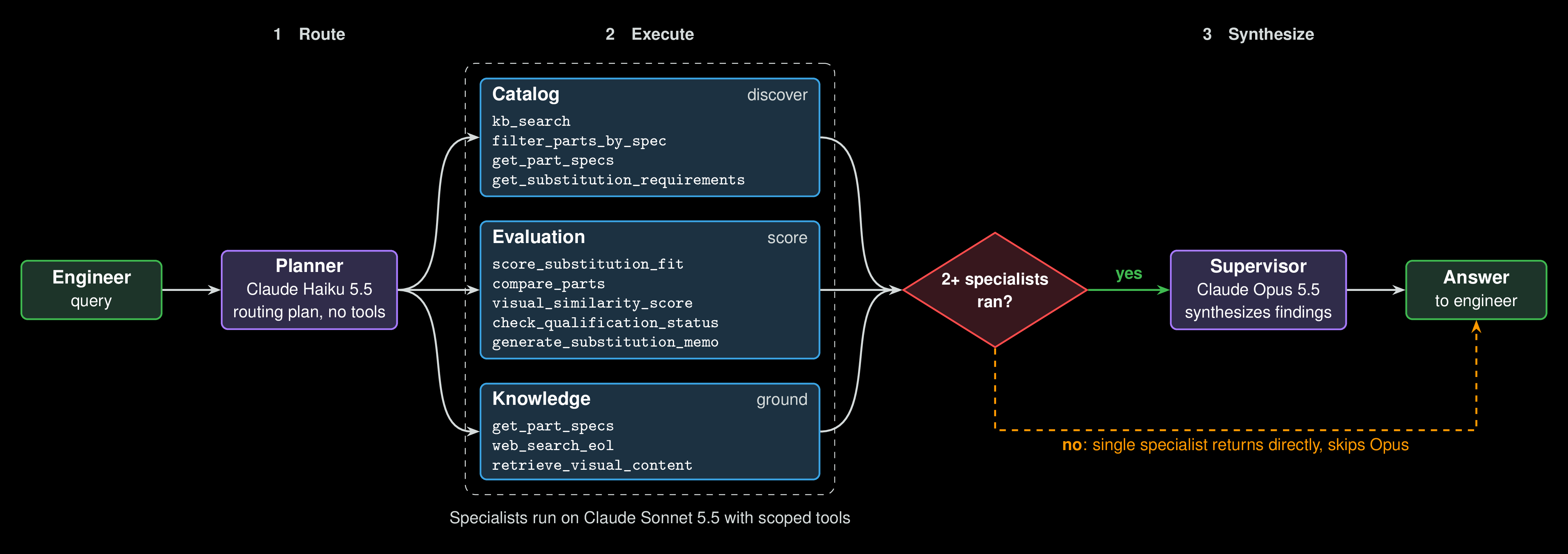
Figure 3: How the planner routes queries to specialists and when the supervisor synthesizes results
- Catalog – Discovers parts through knowledge base search and exhaustive spec filtering (
kb_search,filter_parts_by_spec,get_part_specs,get_substitution_requirements). - Evaluation – Scores candidates deterministically and compares parts visually (
score_substitution_fit,compare_parts,visual_similarity_score,check_qualification_status,generate_substitution_memo). - Knowledge – Answers questions from datasheets and ICDs, checks live end-of-life status, and retrieves visual content (
get_part_specs,web_search_eol,retrieve_visual_content).
Use a small model for routing and a large model for synthesis
Routing is a classification task with no tool calls, so it doesn’t need a large reasoning model. A Haiku-based planner returns a numbered routing plan in a couple of seconds. The Opus supervisor runs only when two or more specialists contributed, because synthesizing a single specialist’s already-complete answer adds about 8 seconds of latency with no quality gain.
# Step 1: Planner (fast model) plans the routing (may be multi-step).
plan_response = planner(planning_prompt)
ordered_specialists = _parse_specialist_plan(str(plan_response))

# Step 2: Execute specialists in sequence, passing context forward
accumulated_context = ""
for spec_name in ordered_specialists:
    specialist = specialists[spec_name]
    specialist_response = specialist(spec_prompt)
    accumulated_context += f"\n[{spec_name.upper()}]: {specialist_response}\n"

# Step 3: Synthesize only when 2+ specialists ran.
if len(ordered_specialists) == 1:
    final_text = steps[0]["response"]
else:
    final_text = str(supervisor(synthesis_prompt))
Splitting the work across three model tiers matches cost and latency to each stage. Haiku classifies the query, Sonnet runs the tools, and Opus writes the combined answer, which is the step where response quality matters most.
Keep the scoring deterministic
The spec-fit evaluation runs as ordinary Python code against a hand-written requirements schema. The schema defines the critical specs and tolerance rules for each component category, and score_substitution_fit compares each spec, counts passes and flags, and surfaces lifecycle risk. Because the verdict must be reproducible for an engineering review package, no LLM is involved in this step.
{
  "categories": {
    "reaction_wheel": {
      "critical_specs": [
        {"field": "voltage_v", "label": "Bus voltage (V)",
         "rule": "match", "required_from_user": true},
        {"field": "mass_g", "label": "Mass (g)",
         "rule": "candidate_lte_reference_within_pct", "tolerance_pct": 20,
         "required_from_user": false}
      ]
    }
  }
}
The tool returns a structured verdict with an explicit disclaimer:
return {
    "spec_results": results,  # per-spec pass/flag/review status
    "counts": counts,
    "out_of_tolerance": out_of_tolerance,
    "lifecycle": {...},  # obsolescence and lead-time flags
    "summary": summary,
    "disclaimer": "Evidence only. This tool does not recommend or approve "
                  "a substitution; the engineer decides.",
}
The specialist presents this table and explains the flags, but it can’t change a verdict. The audit trail follows the same division of work. After every evaluation, the orchestration layer reads the specialist’s tool-call history and writes the audit entry itself, so logging doesn’t depend on the model remembering to do it.
Score visual similarity with Amazon Nova Multimodal Embeddings
Form factor matters when a substitute must fit an existing bracket. The visual_similarity_score tool embeds both part photos with Nova Multimodal Embeddings and computes cosine similarity, then asks Claude to describe the specific observable differences.
def embed_image(image_bytes):
    """Embed one image with Nova MME (IMAGE_RETRIEVAL) -> 1024-d vector."""
    b64 = base64.b64encode(image_bytes).decode('utf-8')
    fmt = 'png' if image_bytes[:8] == b'\x89PNG\r\n\x1a\n' else 'jpeg'
    body = {
        'taskType': 'SINGLE_EMBEDDING',
        'singleEmbeddingParams': {
            'embeddingPurpose': 'IMAGE_RETRIEVAL',
            'embeddingDimension': 1024,
            'image': {'detailLevel': 'STANDARD_IMAGE', 'format': fmt,
                      'source': {'bytes': b64}},
        },
    }
    resp = bedrock.invoke_model(
        modelId='amazon.nova-2-multimodal-embeddings-v1:0',
        body=json.dumps(body), accept='application/json',
        contentType='application/json',
    )
    result = json.loads(resp['body'].read())
    return np.array(result['embeddings'][0]['embedding'])

# cosine similarity of the two photo embeddings
emb_a, emb_b = embed_image(photo_a_bytes), embed_image(photo_b_bytes)
similarity = float(np.dot(emb_a, emb_b) /
                   (np.linalg.norm(emb_a) * np.linalg.norm(emb_b)))
The embedding similarity is deterministic and reproducible, returning around 0.84 for two wheels of the same product family and 0.40 for wheels of different classes. Claude’s vision analysis then explains what drives the difference, for example noting that one housing is roughly twice the diameter of the other and has a six-hole mounting pattern where the other has four.
Retrieve charts and diagrams with two retrieval paths
Text and document queries go through the managed knowledge base backed by Amazon Nova Multimodal Embeddings, routed through the AgentCore Gateway. Image-as-query (uploading a chart or photo to find matching content) uses a native Amazon S3 Vectors index called directly from the agent, because the managed knowledge base retrieval API doesn’t accept image input.
The Knowledge specialist’s retrieve_visual_content tool provides one interface for both paths. An engineer can paste a performance curve from a requirements document into the chat and ask which part matches it, or describe the chart in a text query instead.
# Image-as-query: embed the uploaded image with Nova MME, exactly as the
# datasheet crops and photos were embedded at indexing time.
def embed_query_image(image_bytes):
    b64 = base64.b64encode(image_bytes).decode('utf-8')
    fmt = 'png' if image_bytes[:8] == b'\x89PNG\r\n\x1a\n' else 'jpeg'
    body = {'taskType': 'SINGLE_EMBEDDING', 'singleEmbeddingParams': {
        'embeddingPurpose': 'IMAGE_RETRIEVAL', 'embeddingDimension': 1024,
        'image': {'detailLevel': 'STANDARD_IMAGE', 'format': fmt,
                  'source': {'bytes': b64}}}}
    r = bedrock.invoke_model(modelId=NOVA_MME_MODEL_ID, body=json.dumps(body),
                             accept='application/json', contentType='application/json')
    return json.loads(r['body'].read())['embeddings'][0]['embedding']
On the image path, the upload is embedded with Nova Multimodal Embeddings at 1,024 dimensions using the IMAGE_RETRIEVAL purpose, then matched against the S3 Vectors index:
# Query the native S3 Vectors index and collapse to the best vector per part.
emb = embed_query_image(image_bytes)
s3v = boto3.client('s3vectors', region_name=REGION)
fetch_k = max(top_k * 6, 12)  # each part has several vectors; dedupe below
resp = s3v.query_vectors(
    vectorBucketName=S3_VECTOR_BUCKET, indexName=S3_VECTOR_INDEX,
    queryVector={'float32': emb}, topK=fetch_k,
    returnDistance=True, returnMetadata=True,
)

best = {}
for v in resp.get('vectors', []):
    meta = v.get('metadata', {}) or {}
    pid = meta.get('part_id', '')
    if not pid:
        continue
    sim = 1.0 - v.get('distance', 1.0)  # cosine distance -> similarity
    if pid not in best or sim > best[pid]['score']:
        best[pid] = {'part_id': pid, 'score': sim}
ranked = sorted(best.values(), key=lambda r: r["score"], reverse=True)[:top_k]
Because one part contributes several vectors (its photo, the whole datasheet page, and each cropped chart region), results are deduped to the best-scoring vector per part before they reach the model.
We learned three practical lessons while building the retrieval paths:
- Crop the charts before indexing them – Whole datasheet pages make poor index entries, because roughly 90 percent of a page (header, spec table, footer) is boilerplate that every part shares, and that shared content dominates the embedding. Indexing cropped chart regions alongside the full page solved this. In our testing, chart-upload matching went from 3 of 7 parts correct with whole-page indexing to 7 of 7 with chart-band crops. We define the crop Regions as fractions of the page, which keeps them correct across datasheet resolutions.
- Filter results when the engineer names a part – Cross-modal text-to-image similarity alone doesn’t reliably return the right part’s chart, because a torque curve image contains no visible part name. When the engineer names a specific part, the tool keeps only results from that part’s indexed content, which it identifies by parsing the part folder out of each result’s S3 URI. Because the filter runs in the tool, it works without custom metadata in the index.
- Log every fallback on the image path – The image path returns
Noneon errors and falls through to text retrieval. That fallback is reasonable, but it means a missings3vectors:QueryVectorspermission on the AgentCore runtime execution role doesn’t raise an error. Image-as-query stops working without warning, and the model then names a wrong part with high apparent confidence. The problem is easy to miss during development, because local developer credentials usually have broader permissions than the runtime role. The tool now logs an explicitS3 Vectors image query FAILEDwarning with the bucket, index, and Region whenever that path falls back. Instrument every silent fallback in a retrieval path, because a hard failure is much easier to diagnose than a quiet one.
Produce formal documents with a fixed specialist chain
Chat uses dynamic routing because the right specialists for a freeform question can’t be known in advance. The Integration Impact Assessment works differently. When an engineer requests an impact assessment for a reference and candidate pair, the required sequence is already known, so the service composes the same specialist factory functions in a fixed order with a purpose-built synthesis prompt.
# 1. Knowledge Specialist --- ICD/datasheet interface detail for both parts
knowledge_text = str(knowledge(knowledge_prompt))

# 2. Evaluation Specialist --- structured field delta + qualification check
evaluation_text = str(evaluation(evaluation_prompt))

# Deterministic structured delta for exact summary stats
comparison = compare_parts(reference_id, candidate_id)

# 3. Supervisor --- synthesize into the six-section IIA document
markdown = str(supervisor(synthesis_prompt))
The resulting document covers interface changes, mechanical integration, electrical integration, thermal integration, qualification delta, and supply chain impact. The narrative sections need LLM synthesis, because the pinout and protocol details must be extracted from ICD prose. The summary statistics (matches, differences, total fields) are computed directly from compare_parts output, so the numbers shown alongside the narrative are exact.
Ground lifecycle claims in live web data through AgentCore Gateway
Catalog data goes out of date, so the Knowledge specialist’s web_search_eol tool checks current end-of-life notices, vendor announcements, and lead times through an AgentCore Gateway with the Web Search connector. The Gateway exposes the connector as a governed Model Context Protocol (MCP) endpoint. Because the Gateway also handles managed knowledge base retrieval, you can attach policy and observability to both external and internal data access in one place.
Deploy to AgentCore runtime
For production, you package the agent as an ARM64 container, push it to Amazon Elastic Container Registry (Amazon ECR), and AgentCore runtime hosts it serverlessly with session isolation and auto scaling. Notebook 03 in the GitHub repository walks through this deployment as a reference recipe, covering the Dockerfile, the build and push commands, the execution-role permissions, and the Cedar policy. The notebook shows these steps without running them. Its Dockerfile packages application code that goes beyond the sample, so adapt it to your own application layout before you build. The following diagram shows the deployment path from agent code to a hosted AgentCore runtime endpoint.
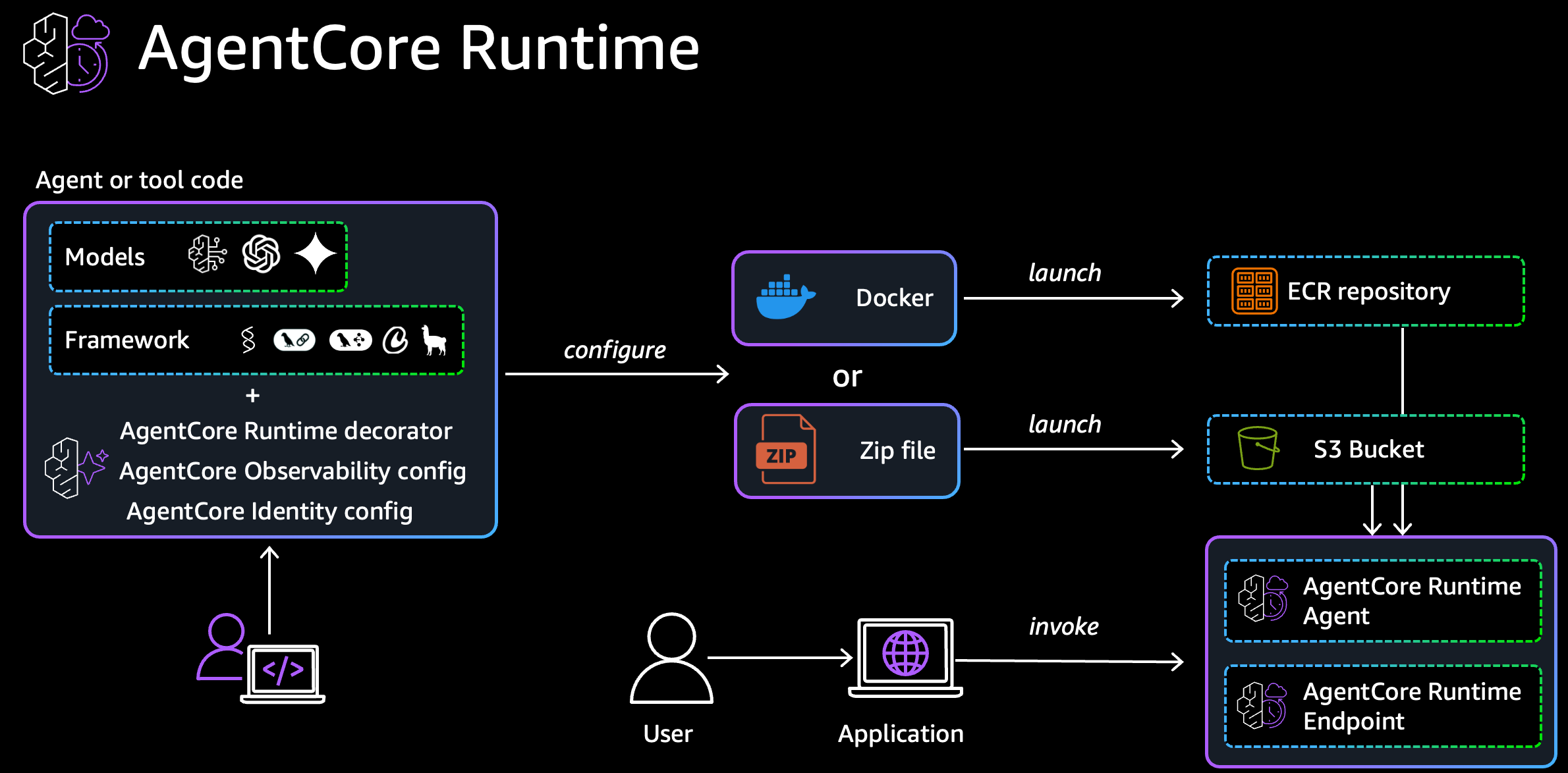
Figure 4: Deployment path from agent code to a hosted AgentCore runtime endpoint
export TAG=mei-$(date +%Y%m%d-%H%M%S)
export ACCOUNT=<your-account-id>
export ECR=${ACCOUNT}.dkr.ecr.us-east-1.amazonaws.com/mfg-engineering-intelligence

# Build the container for ARM64 (required by AgentCore Runtime)
docker buildx build --platform linux/arm64 -f agentcore/Dockerfile \
  -t mfg-engineering-intelligence:${TAG} --load .

# Push the immutable tag to Amazon ECR
aws ecr get-login-password --region us-east-1 \
  | docker login --username AWS --password-stdin ${ACCOUNT}.dkr.ecr.us-east-1.amazonaws.com
docker tag mfg-engineering-intelligence:${TAG} ${ECR}:${TAG}
docker push ${ECR}:${TAG}
Give each image an immutable tag. A runtime that has already resolved the digest behind a moving :latest tag keeps serving the old image after you push a new one. Prompt, router, and tool changes all require a new image and a new runtime version to take effect.
The runtime role needs bedrock:InvokeModel, bedrock:Retrieve, bedrock-agentcore:InvokeGateway, and s3vectors:QueryVectors for the image-as-query path. The Cedar policy shown in notebook 03 encodes the human-in-the-loop rules, requiring a prior evaluation before memos and an audit log entry on every substitution decision. The application enforces these rules in its own logic today, and attaching the policy to a Cedar authorization engine is the next step.
Amazon Nova Multimodal Embeddings is now available in AWS GovCloud (US), which matters for aerospace and defense programs subject to data residency, ITAR, and FedRAMP requirements that govern where a workload can run. The multimodal retrieval and visual similarity capabilities this post depends on are reachable inside an AWS GovCloud (US) boundary. Availability of Amazon Nova Multimodal Embeddings and Amazon Bedrock AgentCore features varies by AWS Region, so check AWS Services by Region before you plan a deployment.
Evaluating the assistant
We measure quality in two ways, with continuous online scoring through AgentCore Evaluations, a capability of Amazon Bedrock AgentCore, and offline validation against curated query sets.
AgentCore online evaluation
Amazon Bedrock AgentCore Evaluations, generally available since March 2026, scores agent traces using LLM-as-a-judge techniques. It reads the OpenTelemetry traces that Strands agents already emit, so an instrumented agent needs no application changes to be evaluated. The service offers two modes. Online evaluation continuously samples live production sessions, and on-demand evaluation runs programmatic tests that fit into a continuous integration and continuous delivery (CI/CD) pipeline.
We use online evaluation, with results published to Amazon CloudWatch for dashboards and alarms. Notebook 05 in the GitHub repository creates an online evaluation configuration and sends test queries to the deployed runtime to generate sessions for scoring.
config = eval_client.create_online_config(
    config_name=CONFIG_NAME,
    agent_id=RUNTIME_ID,
    sampling_rate=SAMPLING_RATE,
    evaluator_list=[
        "Builtin.GoalSuccessRate",
        "Builtin.Correctness",
        "Builtin.Helpfulness",
        "Builtin.Faithfulness",
        "Builtin.ResponseRelevance",
        "Builtin.ToolSelectionAccuracy",
        "Builtin.ToolParameterAccuracy",
    ],
    auto_create_execution_role=True,
    enable_on_create=True,
)
Thirteen built-in evaluators ship with the service, alongside support for custom evaluators defined by a prompt or hosted as an AWS Lambda function. We enable seven, spanning all three scoring levels:
| Level | Evaluator | What it scores |
| Session | Goal Success Rate | Did the conversation achieve the user’s goal end to end? |
| Trace | Correctness | Is the information factually accurate? |
| Trace | Helpfulness | Is the response useful and valuable? |
| Trace | Faithfulness | Is the response faithful to the retrieved context? |
| Trace | Response Relevance | Does the response address the user’s actual query? |
| Tool call | Tool Selection Accuracy | Did the agent pick the right tool? |
| Tool call | Tool Parameter Accuracy | Did the agent extract parameters correctly? |
The curated query set holds 36 queries across six categories: catalog discovery (8), Knowledge and ICD retrieval (8), multi-specialist chains (6), deterministic evaluation (5), text-to-visual retrieval (5), and human-in-the-loop safety refusals (4) that assert the agent refuses to recommend or approve. Each query carries its expected catalog part IDs, except the safety queries, where the expected outcome is a refusal.
export AGENTCORE_RUNTIME_ARN=arn:aws:bedrock-agentcore:us-east-1:ACCOUNT:runtime/YOUR_RUNTIME
jupyter lab 05_evaluation.ipynb
Results
AgentCore samples live sessions on an ongoing basis, so each evaluator’s score is a moving aggregate that shifts as traffic accumulates and as the agent changes. The following numbers are a snapshot from the synthetic dataset run. Use them as a baseline for setting CloudWatch alarm thresholds, and expect the numbers from your own runs to differ.
| Level | Evaluator | Score (30-day avg) |
| Session | Goal Success Rate | 0.892 |
| Trace | Correctness | 0.968 |
| Trace | Helpfulness | 0.956 |
| Trace | Faithfulness | 0.981 |
| Trace | Response Relevance | 0.968 |
| Tool call | Tool Selection Accuracy | 0.861 |
| Tool call | Tool Parameter Accuracy | 0.980 |
All trace-level quality metrics scored at or above 0.95, and tool parameter extraction was near-perfect at 0.980. The most notable improvement between evaluation runs was Tool Selection Accuracy, which rose from 0.809 to 0.861. Three changes drove the gain: consolidating to a single managed knowledge base, fixing a missing permission on the image-as-query path that had caused silent fallback to text search, and tightening the planner’s routing to avoid chaining unnecessary specialists.
Goal Success Rate is lower, at 0.892, because of how the query set is designed. The query set includes safety-category prompts that ask the agent to recommend or approve a substitution. The agent correctly refuses, but the evaluator scores a correct refusal as an unmet goal. We expect this result, because in a human-in-the-loop system the agent must not approve a substitution on its own.
Adapt the pattern to your own catalog
The code is a reusable pattern that works for other part categories, beyond reaction wheels. Swapping domains requires three changes: replace the parts data (a specs.json, description, ICD, datasheet page, and photo per part), edit the requirements schema to define your category’s critical specs and tolerance rules, and point the knowledge base at your S3 corpus. The agents, tools, and scoring engine carry over unchanged. Because the deterministic tools in mei_core are plain Python functions, a PLM or ERP integration can call score_substitution_fit directly, with no agent in the loop.
Clean up
To avoid ongoing charges, delete the resources you created:
- Delete the AgentCore runtime agent and its Amazon ECR repository.
- Delete the AgentCore Gateway and its Web Search and knowledge base targets.
- Delete the online evaluation configuration and the CloudWatch alarms you created.
- Delete the managed knowledge base and the S3 Vectors index.
- Delete the S3 bucket holding the parts corpus.
Conclusion
In this post, we showed how to build a multi-agent engineering assistant that replaces manual part substitution research with automated evidence assembly. The architecture pairs Amazon Nova Multimodal Embeddings, which handles visual similarity scoring and chart retrieval that text-only systems miss, with Amazon Bedrock AgentCore, which provides the production scaffolding of runtime hosting, Gateway-governed retrieval and web search, and quality evaluations. Three design choices matter most. Deterministic code produces every pass/fail verdict, each task runs on the smallest of the three model tiers that handles it well, and only the engineer can approve a substitution.
To get started, clone the GitHub repository, run the notebooks with your own AWS account, and swap in your parts catalog and requirements schema. To go deeper on the retrieval foundations, read Manufacturing intelligence with Amazon Nova Multimodal Embeddings and A practical guide to Amazon Nova Multimodal Embeddings. For production agent patterns, see the Amazon Bedrock AgentCore documentation and the Strands Agents SDK.
About the authors

Aishwarya Gavili
Aishwarya is a Solutions Architect at Amazon Web Services (AWS) supporting commercial Aerospace and Satellite customers, from space startups to enterprises, in architecting and deploying mission-critical cloud solutions. She specializes in retrieval-augmented generation pipelines and multimodal agent systems for manufacturing and engineering workflows, helping customers in regulated industries turn emerging AI capabilities into practical, production-ready solutions.

Adewale Akinfaderin
Adewale is a Science Tech Lead at AWS, where he leads applied science and evaluation for the Amazon Bedrock and 1P Models GTM team. His research on foundation models, agentic retrieval, and neurosymbolic AI has been published at COLM, EMNLP, and TACL, and at workshops at NeurIPS, ICLR, ACL, KDD, and AAAI. He also helps global customers design and deploy generative AI solutions at scale. He has two graduate degrees in physics and a doctorate in engineering.
来源:AWS Machine Learning Blog · aws.amazon.com